The most comprehensive AI-ready analysis of your Apple Health data
Every metric.
Every workflow.
172 metrics (227 CSV columns), built-in AI chat that finds the correlations no chart can show, and per-workout CSV detail. More than any other AI-focused Apple Health tool, with the flexibility to chat in-app or export to ChatGPT, Claude, or Sheets.
Free tier forever. Full CSV export. Your data goes where you tell it.
New in 3.0
Your records, your recovery, your summaries.
Version 3.0 adds Medical Records in Chat, a Dashboard with recovery and sleep scores, and health summaries that arrive on your schedule.
Your medical records, in the conversation
Bring records connected in Apple Health, such as conditions, medications, and lab results, into AI Health Chat. Off by default until you turn them on.
Records in Chat: paid AI Health Chat plans, not during the free trial. Records CSV export: Lifetime Export or AI Health Chat.
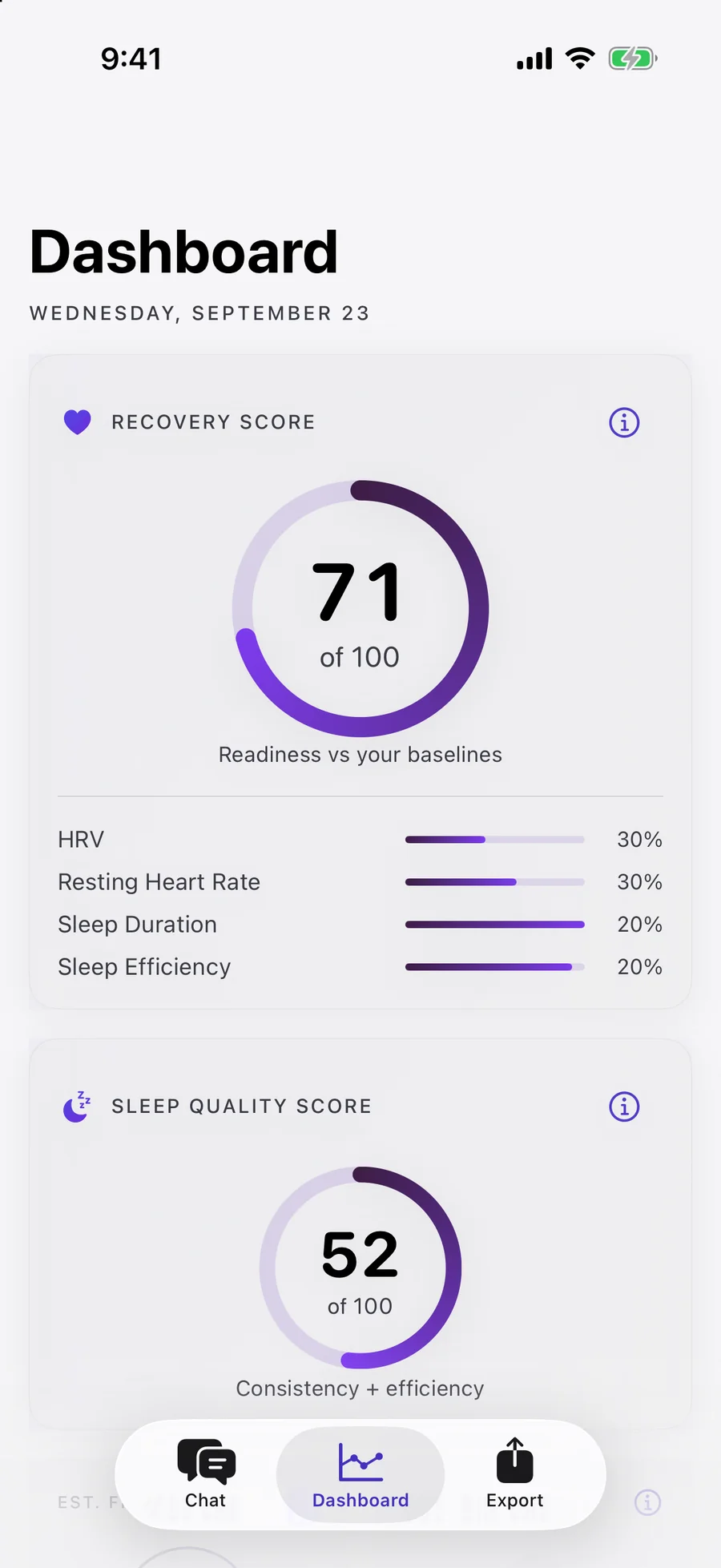
Recovery and sleep, at a glance
A Dashboard with a Recovery Score and a Sleep Quality Score from your Apple Health data, with the method behind each one.
Recovery and Sleep Quality scores are free. Estimated Fitness Age and Bio Age come with Lifetime Export or AI Health Chat. Wellness estimates, not medical advice.
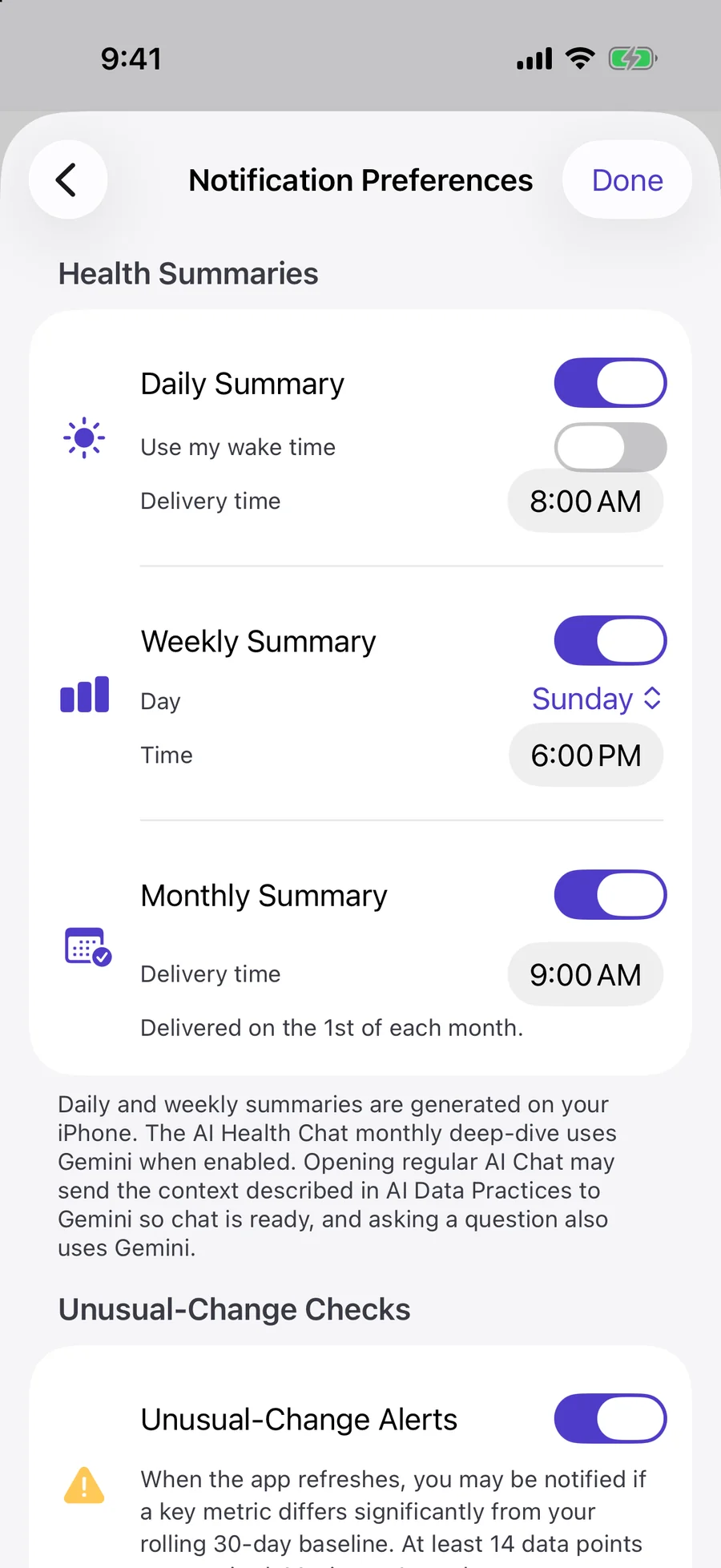
Summaries that come to you
Health summaries at the time you pick, plus optional alerts when a key metric moves away from your 30-day baseline.
Weekly summaries on every plan, monthly with Lifetime Export or AI Health Chat, daily with AI Health Chat. Alerts are optional, at most one a day. On paid plans, they may turn on automatically if notifications are already allowed.
Built-in · AI Health Chat
See the in-app chat in action.
Your Health app data, conversational. AI finds the correlations between metrics — sleep, HRV, caffeine, recovery — that no chart can surface.
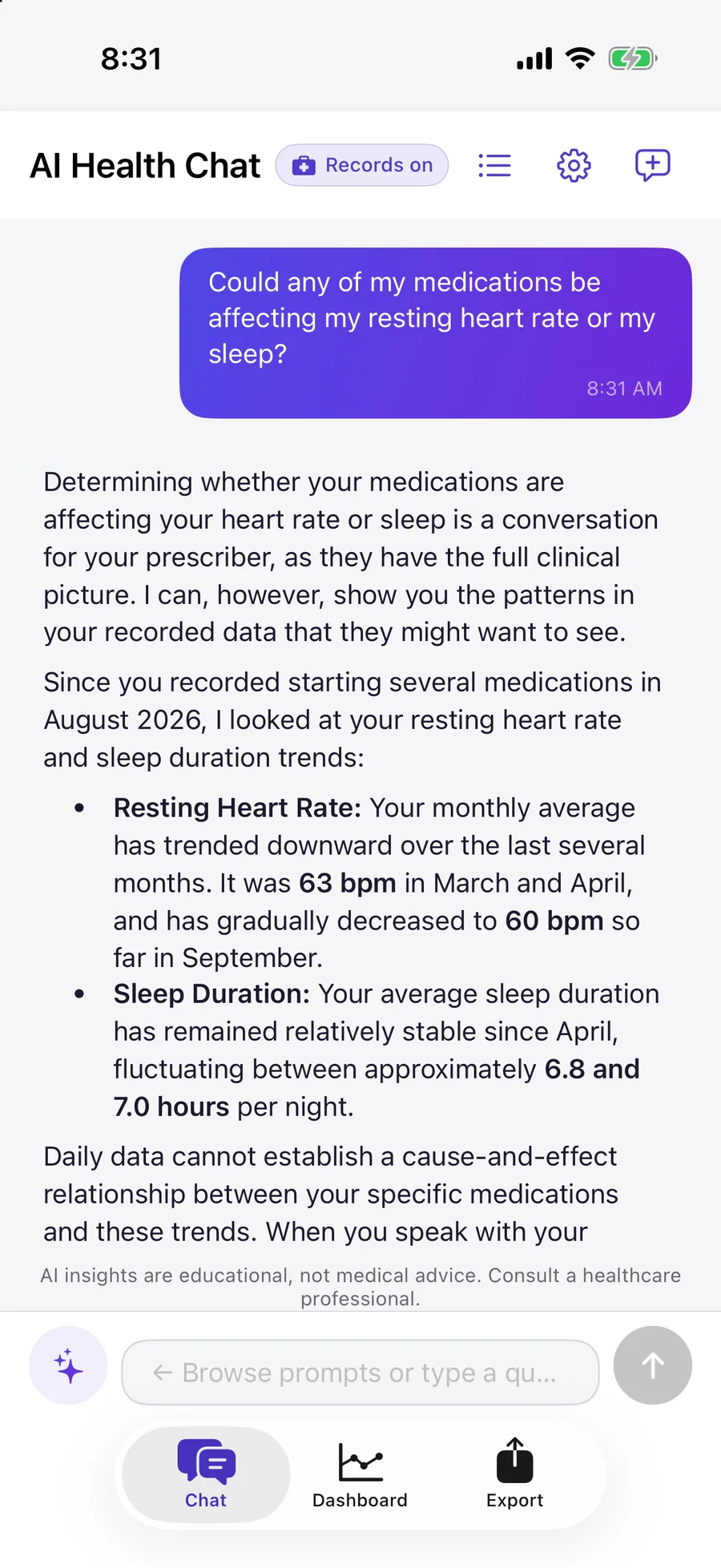
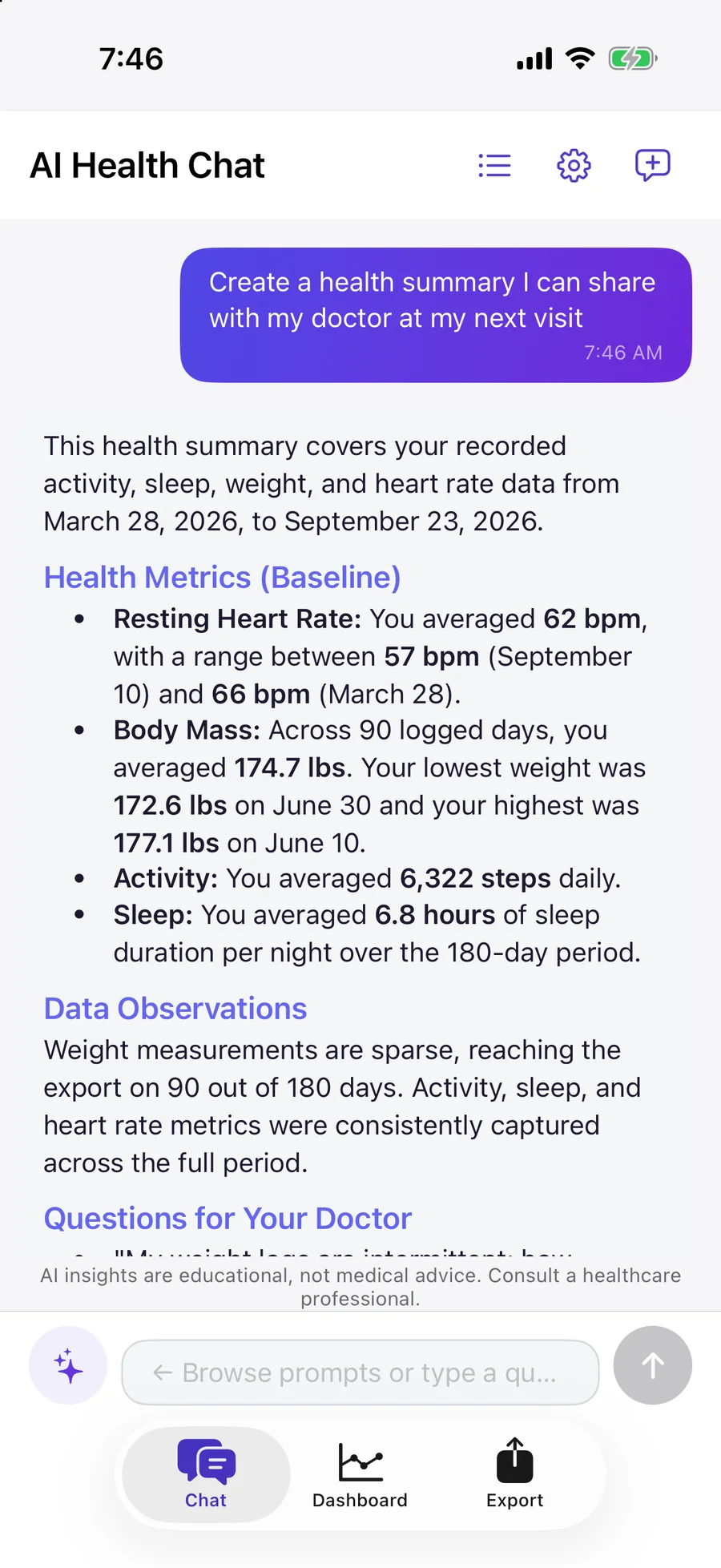
Around 4 second responses
Gemini 3.1 Flash-Lite, tuned across 5 model comparisons and 75 test prompts. Context caching gives a 10× speedup on follow-ups.
Timeline zoom
Ask about a specific moment — "what was my HRV at 3pm Tuesday?" — and the app pulls minute-level Health app data on demand.
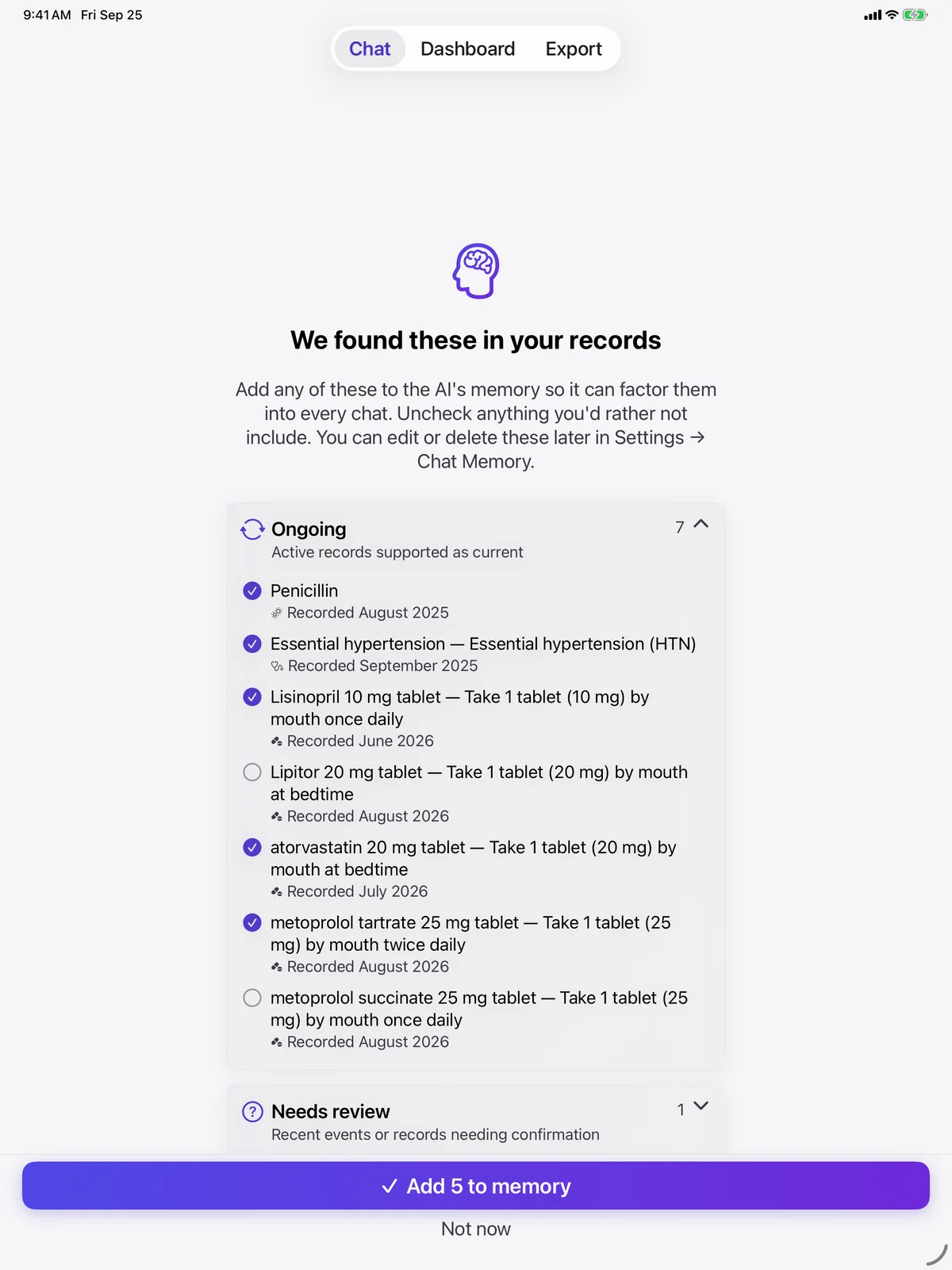
Memory that persists
Tell it your meds once — it remembers next chat, next week, next month. No re-pasting context.
Chat memory · AI Health Chat
Tell it once. Remembered.
Medications, conditions, allergies, goals — the AI keeps them in context, then finds correlations between your Health metrics through that personal lens.
- Auto-extracted from conversation. Edit or delete any fact anytime.
- Device-local storage. Facts are stored on your iPhone. They are included in the health context sent to Gemini when you open AI Health Chat, and nowhere else.
- Explicit control. Clear all memory from Settings, any time.
Pre-built · AI Health Chat
50 biohacker prompts. Zero setup.
Don’t know what to ask? Each starter prompt finds a real relationship in your Health app data.
Heart Health
"How has my resting heart rate trended — is it improving or declining?"
Sleep
"How much sleep am I actually getting vs. how long I’m in bed?"
Fitness & Activity
"Am I meeting the WHO recommended 150 minutes of exercise per week?"
Weight & Body
"How has my weight trended over the past year?"
Nutrition
"What does my average daily calorie intake look like vs. what I’m burning?"
Patterns & Correlations
"What factors seem to affect my HRV the most?"
Health Trends & Alerts
"Have any of my health metrics changed significantly in the last 3 months?"
Doctor-Ready Summaries
"What questions should I ask my doctor based on my health data?"
Goals & Next Steps
"What’s a realistic daily step goal based on my actual history?"
Pick your workflow. We handle the data.
Four ways to get answers from your Health app data. You choose. No path is “the right one.”
Export to Spreadsheets
Open your 1-year HRV trend in Numbers, Excel, or Google Sheets. Pivot tables, your own charts, any analysis you want.
How it worksPaste into Any AI Tool
Export the compact CSV plus our AI Data Guide. Drop both into ChatGPT, Claude, or Gemini. The guide does the heavy lifting.
How it worksAsk In-App (AI Health Chat)
"How has my HRV trended with caffeine this month?" Real answer in seconds. No copy-paste, no context loss.
Try AI Health Chat freeFeed Your Own Pipeline
Clean CSV, AI-optimized schema. Build your own dashboard, Python analysis, or custom AI workflow.
See the format172 metrics. More than any other
AI-focused Apple Health tool.
Activity, heart, sleep, nutrition, symptoms, cycle tracking, iOS 18+ workout effort scores. Daily summaries plus per-workout detail, both formatted for AI.
New in v3.0: export all 8 Apple Health medical record types — medications, conditions, allergies, immunizations, lab results, procedures, vital signs, and clinical notes — from the patient portals you link to Apple Health. Insurance/coverage data is never read, exported, or sent to AI.
How it compares
The only tool with built-in AI chat and full CSV export.
Four ways to get your Apple Health data into AI. Three of them make trade-offs. One doesn't.
AI Health Export
172 metrics
- Built-in AI chat (Gemini 3.1 Flash-Lite)
- Per-workout CSV detail
- Export to ChatGPT, Claude, Gemini, anywhere
- Free tier forever + $14.99 lifetime option
- Daily CSV stays on iPhone by default
Health Auto Export
Deep metric coverage
- No built-in AI chat
- Per-workout detail
- CSV export to anywhere
- No built-in AI chat
- On-device export
ChatGPT direct
Limited subset
- AI chat (OpenAI)
- No per-workout data
- Locked to OpenAI, no CSV
- No file you can keep — answers only
- Data sent to OpenAI servers
Apple Health export
Full XML dump
- No AI chat
- Unparseable by AI tools (500MB-1GB XML)
- No CSV format
- Free (built into iOS)
- On-device
Counts verified against AI Health Export v3.0 (September 2026). See the full /metrics catalog or the ChatGPT direct comparison for the long-form breakdown.
Your data. Your pipeline.
You decide where anything goes. We give you the options — not the lock-in.
Stays on iPhone
CSV export path. Your health data never leaves the device. Default for Free and Lifetime Export.
Google Gemini (opt-in)
AI Health Chat path. Daily summaries by default, with a narrow on-demand detail window when a question needs it. Google does not use paid API data to train its general models.
Your chosen AI tool
Paste the CSV into ChatGPT, Claude, or anywhere. Their terms apply. You decide.
Your spreadsheet or analytics
CSV is yours to pipe into anything. Full history, all 172 metrics.
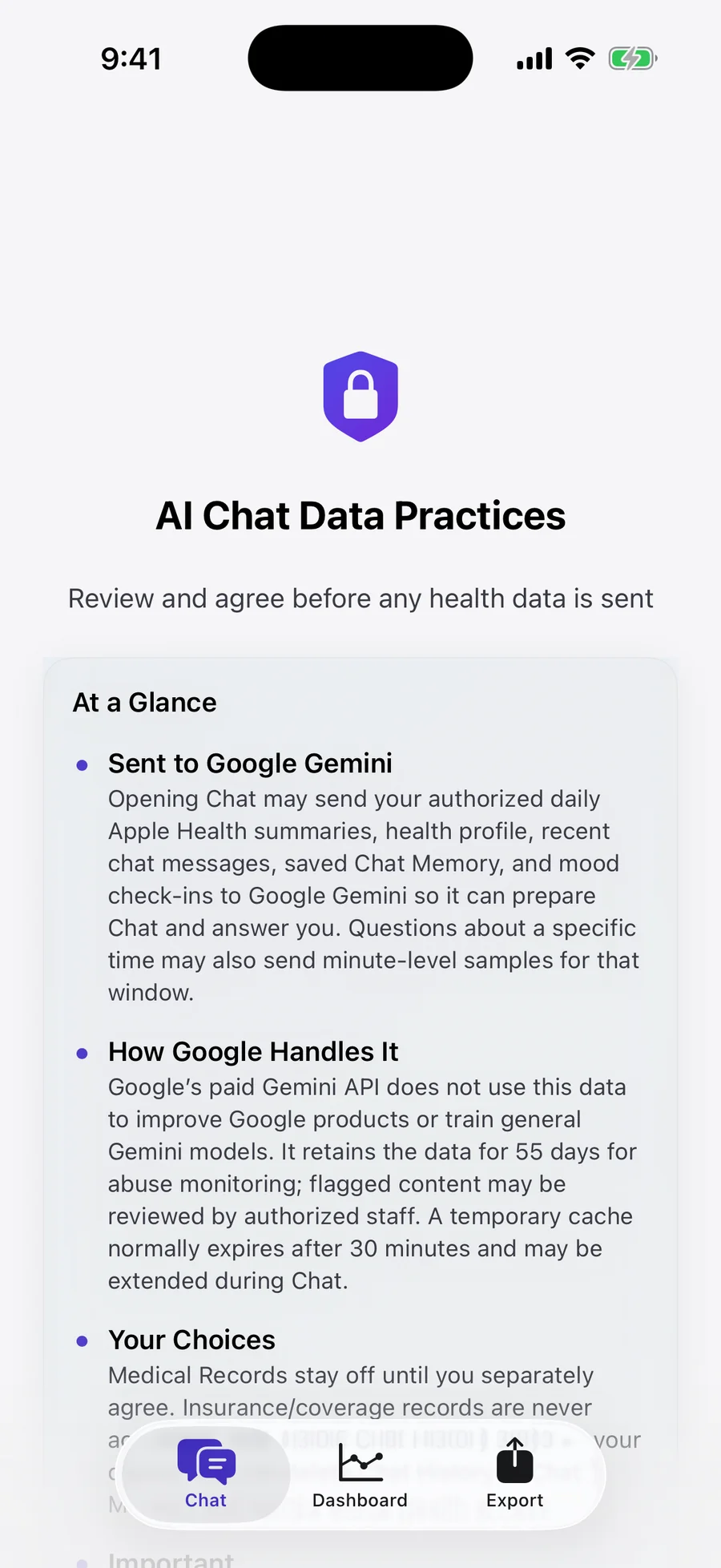
Review it before anything is sent.
Before AI Health Chat prepares or sends any health data, the AI Data Practices screen shows what goes to Google Gemini, how Google handles it, and your choices. Nothing is sent until you agree.
AI Health Chat is for adults 18 and older. You can delete chat history and saved memory at any time.
- No ad tracking, no ads, no data brokering
- We do not operate servers that store your health data
- Full CSV export any time — walk away with your history
- Free tier forever — never forced into a subscription
Guides & Resources
Step-by-step guides to get the most out of your health data with AI.
AI Chat Deep Dive
See how AI Health Chat handles speed, memory, function calling, prompts, and privacy boundaries.
Explore chat →Convert to CSV
Step-by-step guide to getting clean, AI-ready CSV files from your Health app.
Read guide →Health Data + ChatGPT
Fix the “file too large” problem and get ChatGPT analyzing your health data in seconds.
Read guide →AI Analysis Guide
Find trends and correlations across years of health data using any AI tool.
Read guide →vs ChatGPT Health
Side-by-side feature and privacy comparison between AI Health Export and ChatGPT Health.
Read comparison →Best Apple Health Export Apps for AI (2026)
Compare the top apps for exporting and analyzing Apple Health data with AI tools in 2026.
Read guide →Use AI on Your Health Data Without Sending It to OpenAI
Keep your health data completely private while still getting powerful AI-driven insights.
Read guide →Bring an AI Health Summary to Your Doctor Visit
Turn years of Apple Health data into a clear, shareable summary your doctor can actually use.
Read guide →What Years of Apple Watch Data Can Tell You
Discover long-term health trends hidden in your Apple Watch data using AI analysis.
Read guide →All 172 Metrics
Browse the full catalog of HealthKit metrics — activity, heart, sleep, nutrition, symptoms, and more.
Browse metrics →Pick the plan that fits your workflow.
Free forever. Lifetime Export once. AI Health Chat for the full workbench.
Free
Forever. No credit card.
- 7-day export window
- 20 foundational metrics
- AI Data Guide for ChatGPT/Claude
- CSV export
Lifetime Export
For the “just want export” workflow.
- All time periods, all 172 metrics
- CSV export to ChatGPT, Claude, Gemini, Sheets, Excel, Numbers
- AI Data Guide explaining every exported field
- One-time purchase. No subscription.
AI Health Chat — Annual
$12.50/mo effective. Or $14.99/mo billed monthly.
- Everything in Lifetime Export
- In-app AI Chat with Gemini 3.1 Flash-Lite
- Chat Memory — meds, conditions, goals remembered
- 50 biohacker prompts pre-built
- Function calling — minute-level zoom on demand
- Cancel anytime
AI Health Chat subscriptions billed by Apple. Trial converts to paid unless canceled at least 24 hours before it ends.
Manage in iOS Settings → Apple ID → Subscriptions.